

The fastest way to host a meetup is to publish a short activity listing (what you're doing, when, and exactly where to meet) inside a real-time, activity-first app like Conppi, then let availability filters do the matching. Skip the group pages and event descriptions. Set a tight time window, confirm one meeting point, and turn on in-app chat. Safety comes right after that: keep location sharing approximate until you're face to face.
TL;DR:
- Listing activities with a clear title, specific start time, exact meeting point, and group details can be set up in under a minute for faster responses.
- Keep location sharing approximate until you meet, choose public spots, and confirm attendance with a quick check-in within 15 minutes to maximize safety and reliability.
- Use real-time filters for availability and duration to attract nearby participants quickly, with reposts and minor adjustments if responses are slow or absent.
- Sharing only essential details and avoiding lengthy descriptions reduces perceived effort and matches the fast-paced nature of spontaneous meetups.
- Conppi's activity-focused model matches participants by timing and location rather than profiles, shortening hosting time and increasing likelihood of timely meetups.
Table of Contents
- A Quick Checklist to Get a Meetup Live in Under 10 Minutes
- How to Create, Publish, and Confirm a Same-Day Meetup
- Essential Safety and Privacy Rules to Follow
- Practical Coordination Tips to Reduce No-Shows
- Why Activity-First Matching Beats Swiping for One-Off Meetups
- How Conppi Helps You Host a Meetup Faster
- Sources
- FAQ
A Quick Checklist to Get a Meetup Live in Under 10 Minutes
Most people overthink this. A meetup listing that works has five things, and none of them take more than a sentence to write.
- Activity title and one-line pitch. Name the activity plainly ("Evening run, easy pace" beats "Fitness enthusiast seeking motivation buddy") and add a single sentence on what to expect.
- Start time and duration. Say whether it's happening right now, in an hour, or later today. Vague windows kill same-day interest.
- Exact meeting point. Drop a landmark or a photo of the spot. "Near the park" gets ignored; "by the fountain at Vondelpark's south entrance" gets replies.
- Skill level and group size. One line ("all levels welcome, max 4 people") prevents mismatched expectations and awkward no-shows.
- In-app chat and distance sharing. Turn on chat before you post, and set location to approximate rather than exact. You don't need your street address to organize a meetup.
That's the whole listing. Anything longer starts to feel like a job posting, and people scrolling a real-time feed are looking for something to join in the next hour, not a project to apply for.
How to Create, Publish, and Confirm a Same-Day Meetup
Hosting a meetup isn't about planning a full event. It's closer to sending a well-organized text to a group of strangers who already want to do the same thing you do. Here's the sequence that gets a listing from idea to handshake:
- Pick the activity type and a short time window. A window of one to three hours produces far more responses than "sometime this weekend." Research on context-aware social matching backs this up directly: real-time availability predicts match interest better than static profile details do.
- Write one sentence that sets the tone. "Casual padel, just for fun, no scorekeeping" tells a stranger exactly what they're walking into. Skip the résumé.
- Set the meeting point with a photo. Public spots only, coffee shops, courts, coworking lounges, gyms. A photo removes the "wait, which entrance?" text exchange later.
- Filter by availability, not just interest. Use the app's right-now or within-the-hour filters and keep your radius realistic; a 20-minute walk usually beats a 20-minute drive for turnout.
- Turn on chat immediately and confirm headcount. Send a short check-in message about 15 minutes before start time. If two people said yes but only one replies to the check-in, you still have a meetup.
- If nobody responds in the first 20 to 30 minutes, widen the radius, stretch the time window by an hour, or repost with a small hook ("first coffee's on me"). Copying a listing that didn't land and reposting it at a slightly different time often works better than editing the original.
Pro Tip: Save your best-performing listing as a template. A one-off run club post that pulled three replies on Tuesday will probably pull three more on Thursday if you just swap the time.
Essential Safety and Privacy Rules to Follow
Meeting a stranger from an app for coffee or a run is not the same risk profile as meeting one for a date, but the basics still apply, and they take about thirty seconds to set up.
- Share approximate location, not your exact address. Good activity apps show distance in ranges (like "1.2 miles away") rather than a pin on your building. Keep it that way until you've actually met.
- Choose public, populated meeting spots. Cafés, parks with foot traffic, gyms, coworking spaces. Save anything more private for after you've met once.
- Tell someone where you're going. A text to a friend with the activity, time, and location takes ten seconds and costs nothing.
- Set a simple check-in time with the other person. If they're not there or haven't messaged within 10 to 15 minutes of the agreed time, that's your cue to leave.
- Use the app's report function for anything that feels off. Don't wait until after the meetup to flag a bad interaction.
- Agree on a no-show rule upfront. Something as simple as "if you're not here in 15 minutes, I'm heading out" keeps expectations clear and avoids awkward waiting.
Practical Coordination Tips to Reduce No-Shows
The gap between a meetup that happens and one that quietly dissolves usually comes down to timing and clarity, not chemistry.
- Send a final confirmation 15 to 20 minutes before start time. A short "still on for 6pm at the coffee shop?" catches people who got distracted, and it's often the difference between two people showing up and zero.
- Name yourself and the exact spot in every message. "Hey, it's Mark, I'll be at the corner table by the window" beats "see you there!" every time.
- Ask for a quick identifier right before meeting. A selfie in the chat or a one-line "I'm in a red jacket" saves the awkward five minutes of scanning a crowded room.
- Keep the format simple enough to repeat. If a Tuesday evening co-working session worked once, reuse the same structure instead of reinventing the pitch each week. Reusable, low-effort formats are also the easiest to organize with friends when you want to bring more than one person along.
Pro Tip: Keep every confirmation and check-in inside the app instead of jumping to text or email. Switching platforms mid-coordination is one of the most common ways people lose momentum and quietly ghost a meetup they meant to attend.
Why Activity-First Matching Beats Swiping for One-Off Meetups
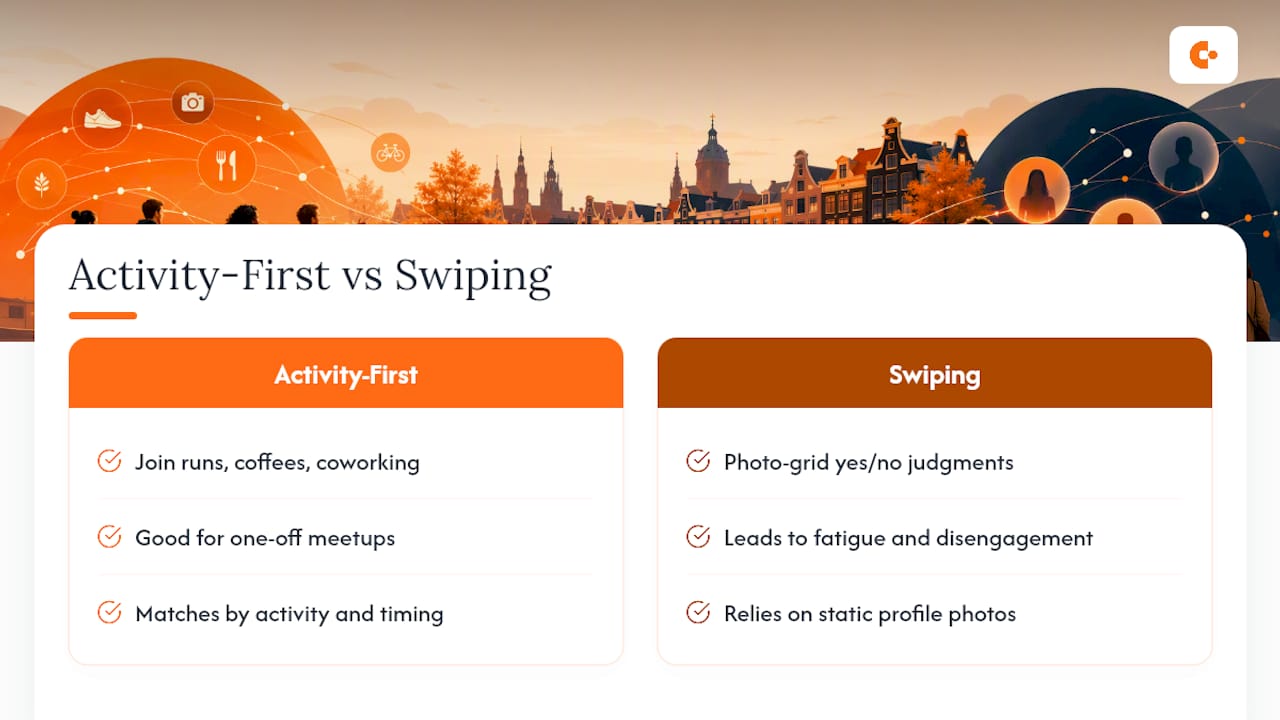
Swiping was built for a different job. It optimizes for a single yes/no judgment based on a photo grid, and researchers modeling engagement cycles in swiping apps have documented a predictable pattern of fatigue and disengagement the longer someone stays in that loop. An activity listing skips that loop entirely. You're not judging a stranger's face, you're joining a run, a coffee, or a coworking session that already has a clear frame.
That frame matters more than it looks. Studies on context-aware social matching found that mood, availability, and immediate context predict interest in meeting someone far better than static profile matching does. Pair that with findings on contextual rarity and sociability in mobile encounters, and the pattern is consistent: specific, time-bound, activity-based invitations outperform generic browsing. Conppi's activity partner model is built directly around that same logic, matching by activity and timing rather than profile swiping.
— Ilya
How Conppi Helps You Host a Meetup Faster
Conppi is built for exactly the moment this article is about: you want to do something now, and you want company for it. No profile grooming, no swiping, no waiting for a formal group to hit critical mass.
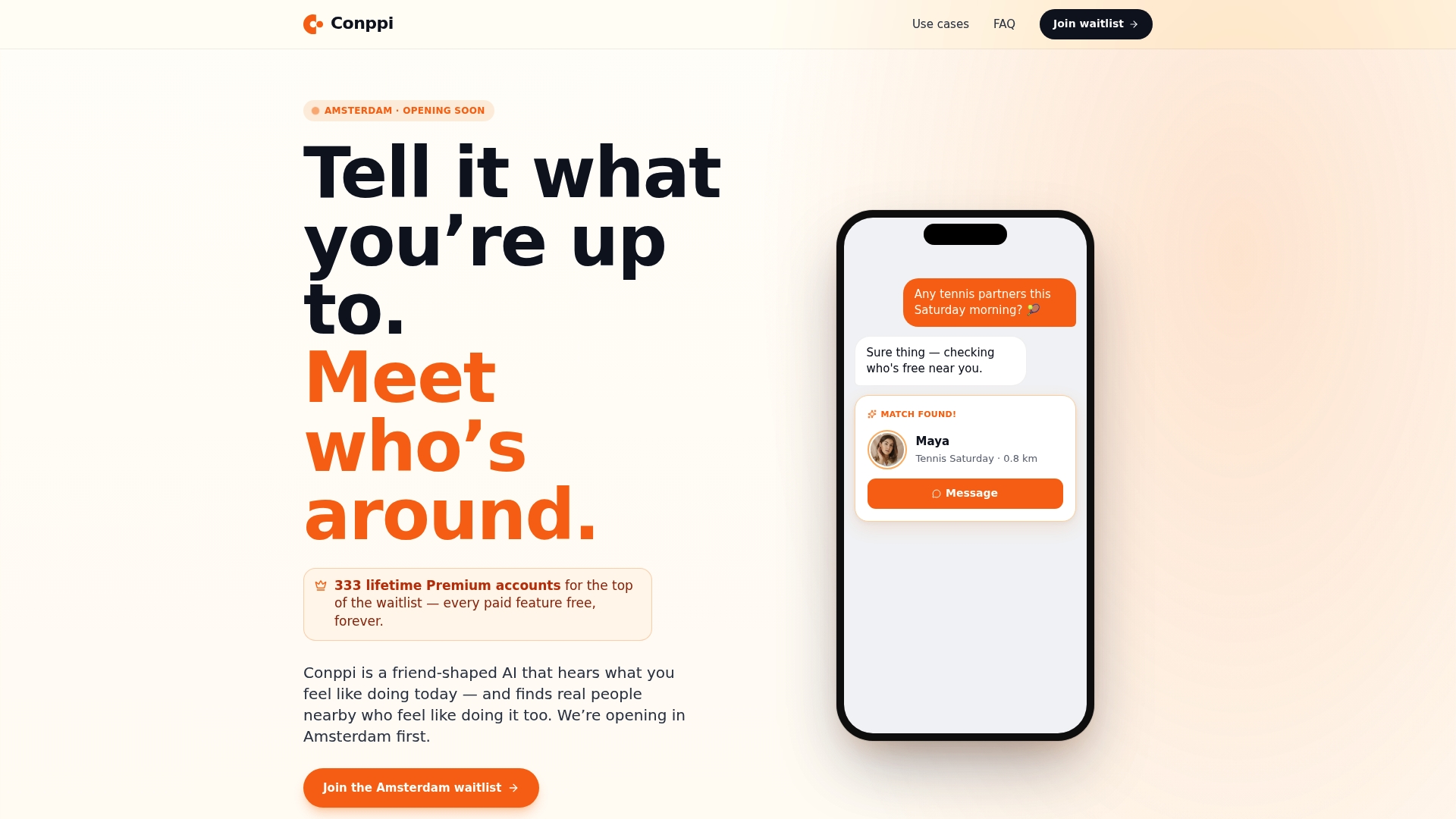
Open the app, pick an activity, tag your skill level, and set your window. Conppi matches you by real-time availability and approximate distance, not by scrolling through strangers' bios. Whether that's a tennis partner for a 6pm match, a padel game on short notice, someone to co-work with at a nearby café, or a local to show you around while you're traveling, the flow is the same: post, filter, chat, meet. If your goal is professional rather than social, the networking filters narrow matches by field and intent instead of activity type. Open Conppi, create your first activity listing, and see who's free in the next hour.
Sources
- Emotional dynamics and engagement cycles in swiping dating apps: An agent-based modeling approach
- Supporting Opportunities for Context-Aware Social Matching
- Identifying Opportunities for Valuable Encounters
FAQ
How Long Should a Same-Day Meetup Listing Stay Open?
Keep the window between one and three hours; listings tied to a specific, near-term time consistently draw more responses than open-ended ones.
What If No One Responds to My Meetup Listing?
Widen your search radius, stretch the time window by an hour, or repost with a small hook like offering to buy the first coffee.
Is It Safe to Share My Exact Location When Hosting a Meetup?
No. Share only approximate distance until you've met in person, and always choose a public meeting spot for the first encounter.
What App Features Actually Matter for Hosting a Meetup?
Real-time availability filters, approximate distance sharing, and built-in chat matter most. Conppi's activity-based matching uses all three instead of static profile browsing.
How Do I Handle a No-Show?
Set a simple rule beforehand, such as leaving if the other person hasn't arrived or messaged within 15 minutes, and keep the fallback plan (rescheduling or reposting) ready.