
Location sharing can be safe, but only under specific conditions: you choose the recipient, you set a time limit, and the app doesn't quietly build a permanent record of everywhere you've been. Four variables decide the outcome every time: who sees your location, how long the share stays active, whether history gets stored, and whether the app itself has a track record of protecting that data. Get those four right and sharing your pin is a low-risk convenience. Get them wrong and it's an open door.
TL;DR:
- Sharing location should be limited to trusted individuals, with usage restricted to short time frames and minimal data storage to reduce risks.
- Live sharing and background location tracking pose higher risks by revealing routines and patterns, especially if history is stored or security is weak.
- Regular permission reviews, disabling unnecessary background access, and removing outdated shares can significantly lower exposure.
- Avoid sharing locations in group chats or via forwardable links, and always revoke access immediately if the sharing link spreads beyond the intended recipient.
- Using apps that offer approximate, proximity-based sharing instead of precise location can help balance safety and privacy.
Table of Contents
- Benefits and Risks of Sharing Your Location
- How Location Sharing Actually Works
- A Privacy Checklist to Audit Right Now
- Matching Threats to the Right Fix
- Six Rules for Low-Risk Sharing
- Where Connection and Privacy Actually Meet
- A Way to Meet Nearby People Without the Tracking Tradeoff
- Sources
- FAQ
Benefits and Risks of Sharing Your Location
People turn on location sharing for good reasons, and most of those reasons hold up. A parent tracking a teenager's drive home, a friend confirming you made it back from a late shift, a group meeting up at a festival where phone service is spotty. It works. The same feature that makes coordination effortless is also what makes it dangerous in the wrong hands.
The upside is concrete:
- Safety check-ins. Sharing your live location during a solo run, a rideshare, or a first date gives someone a way to intervene fast if something goes wrong.
- Commute transparency. Families use it to confirm safe arrivals without a string of "are you there yet" texts.
- Meetup coordination. Finding someone in a crowded venue or a foreign city gets a lot easier with a shared pin.
- Travel logistics. Groups splitting up during a trip can regroup without guessing.
The downside is where things get serious. Domestic abuse and stalking cases increasingly involve a partner or ex who never had permission revoked from an old shared link. Opportunistic theft is a quieter risk: a public post tagged at your home address, or a "live from the airport" story, tells anyone watching that your house is empty. Then there's the invisible layer: ad tracking, stalking potential, and social engineering are the three risks security researchers flag most often when location sharing gets enabled by default rather than by choice.
The risk profile also changes depending on how you share. A live, continuously updating share carries far more exposure than a static pin dropped once. A live share reveals patterns, routines, and routes. A static pin reveals a single moment. That distinction matters more than most people realize when they're deciding what to turn on.
How Location Sharing Actually Works
Three different mechanisms get lumped together under "location sharing," and they don't carry the same risk.
Live sharing streams your GPS position continuously to whoever's on the other end, usually for a set window (an hour, a day, "until I turn it off"). A static pin is a single snapshot, your location at the moment you sent it, with no further updates. Background location is the quiet one: apps that track your position even when you're not actively using them, often to power features like traffic alerts or "nearby deals."
Location history is what turns any of these into a bigger liability. Once an app stores a timeline of where you've been, it's not just tracking your present, it's building a searchable record of your patterns: your gym schedule, your commute, where you sleep most nights. If that account gets compromised, the "blast radius" isn't one bad afternoon, it's months of movement data.
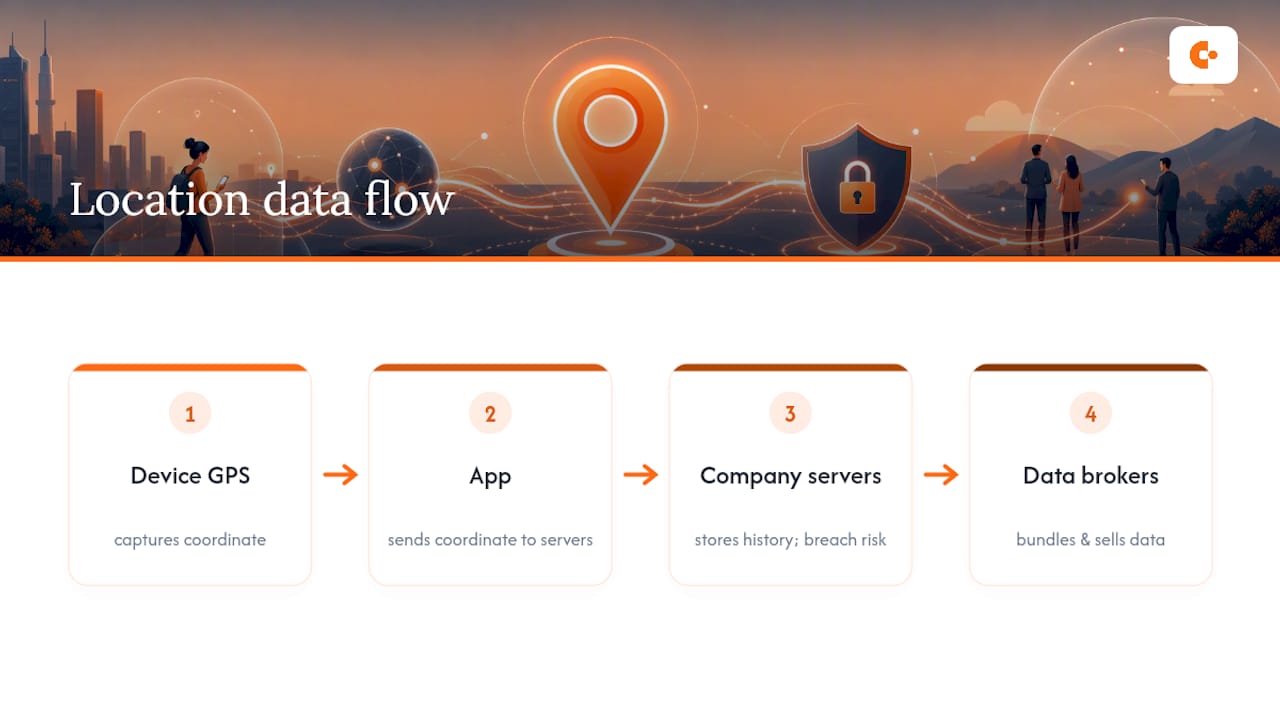
The data flow itself is worth understanding: your device's GPS chip captures a coordinate, your app sends it to the company's servers, and depending on the app's business model, that coordinate might get bundled and sold to a data broker or ad network. A security flaw in the tracking app iSharing exposed millions of users' precise coordinates and profile details, proof that the weak link is often the vendor's own security, not just who you chose to share with. For a deeper technical look at how phones triangulate position through GPS, Wi-Fi, and cell towers, see this breakdown of how smartphones track your location.
A Privacy Checklist to Audit Right Now
Most people have location permissions scattered across a dozen apps they forgot they granted access to. Fixing that takes about fifteen minutes.
- Open your permissions list. On iPhone, go to Settings > Privacy & Security > Location Services and review every app set to "Always." Almost none of them need it.
- Switch nonessential apps to "While Using" or "Never." Weather apps, retail apps, and games rarely need background location.
- Turn off location history where you can. If an app offers a timeline feature you don't use, disable it. Fewer stored points means less to lose if the account is breached.
- Run a platform safety check. iPhone's Safety Check tool (Settings > Privacy & Security > Safety Check) lets you see and instantly revoke everyone you're sharing with. Android's permission manager (Settings > Security & Privacy > Privacy > Permission Manager) does the equivalent.
- Clean out old shares. Check who you're still sharing with in Find My, Google Maps, or Life360 style apps, and remove exes, old roommates, or anyone from a trip two years ago.
- Set a recurring reminder. Review location-sharing settings quarterly. Circumstances change, and permissions rarely get revisited unless something forces the issue.
To confirm a share is actually off, don't just trust the toggle. Close and reopen the app, or ask the other person if your dot is still moving on their end.
Pro Tip: Screenshot your permissions list before you make changes. If an app breaks afterward, you'll know exactly what to re-enable instead of guessing.
Guides on balancing convenience with privacy consistently point to time-limited sharing and permission audits as the two highest-impact habits, and the eSafety Commissioner's location-sharing guidance backs the same approach.
Matching Threats to the Right Fix
Not every location risk needs the same response. Stalkerware, unauthorized tracking apps hidden on a device, behaves differently from ad-tech profiling, and the fixes don't overlap.
- Stalkerware. Watch for a phone that's unusually hot, drains battery fast, or shows unfamiliar apps with generic names like "System Update." Run a mobile security scan, check for unrecognized device administrators in your settings, and if you suspect a partner or ex installed something without consent, contact local police or a domestic violence hotline before removing the app. Deleting it can alert the person monitoring you.
- Data brokers. These companies buy bulk location data from apps and resell it. You can't fully opt out, but minimizing stored history and reviewing app-level ad personalization settings shrinks the pool of data available to sell.
- Forwarded links. Any "share my location" link you send can be forwarded by the recipient to someone else. Treat the link like a spare key. Set expirations, use password protection where the app allows it, and assume a link posted to a group chat is no longer private the moment it's sent.
Apps sometimes retain background access through device identifiers even after you think you've opted out, which is exactly why a permissions audit needs to check background refresh settings, not just the main toggle.
Six Rules for Low-Risk Sharing
Safe sharing comes down to habits more than settings. Build these six into how you use your phone and most of the risk disappears.
- Default to time-limited shares. An hour or a day, never indefinite, unless it's a standing arrangement with someone you fully trust.
- Share one-to-one, not to groups. A location sent to a group chat is a location sent to everyone that chat ever adds.
- Stop sharing the moment you arrive. There's rarely a reason to keep a live share running after the meetup starts.
- Favor tools that don't log history. Ephemeral, one-time links avoid building a permanent movement database tied to your identity, which is the safer default whenever it's available.
- Rotate and revoke if a link spreads. If you suspect a share got forwarded further than intended, kill it and generate a new one.
- Match your sharing to context. Research on user behavior confirms people already adjust their sharing sensitivity by recipient and purpose, family gets more, a work contact gets less. Trust that instinct and build settings around it instead of using one blanket permission for everyone.
Pro Tip: If an app doesn't let you set an expiration on a share, treat that as a red flag about how the app handles your data generally, not just that one feature.
Where Connection and Privacy Actually Meet
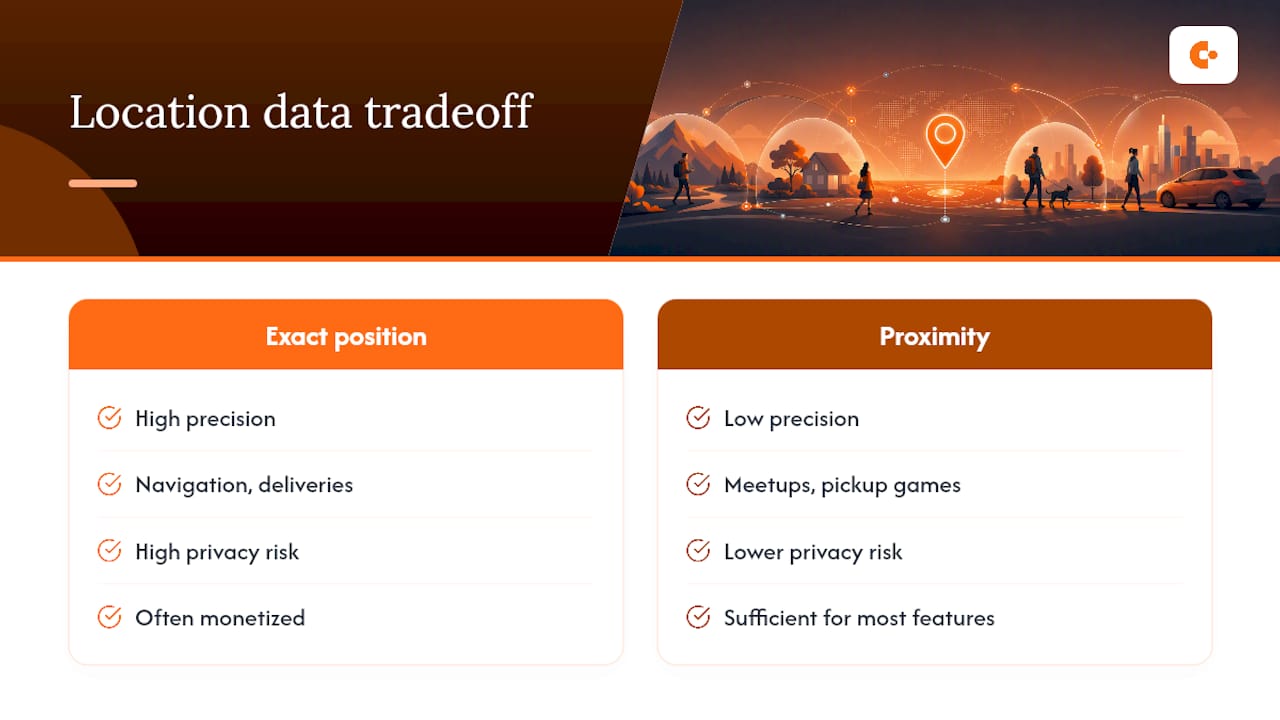
Building a product that gets strangers into the same room requires thinking hard about what location data actually needs to leave your phone. Most social apps default to more precision than the interaction requires. The truth is a coffee meetup or a pickup basketball game doesn't need your exact coordinates, it needs to know you're close enough to say yes.
That's the design question worth asking before you accept any app's location prompt: does this feature need my exact position, or just proximity? Most of the time, proximity is enough. Apps that ask for more than that are usually monetizing the extra precision, not improving your experience.
— Ilya
A Way to Meet Nearby People Without the Tracking Tradeoff
Everything above is about controlling exposure when you're already sharing your location with someone you know. But what about meeting someone new? That's a different problem, and it's the one Conppi was built to solve without asking you to broadcast a live pin to a stranger.
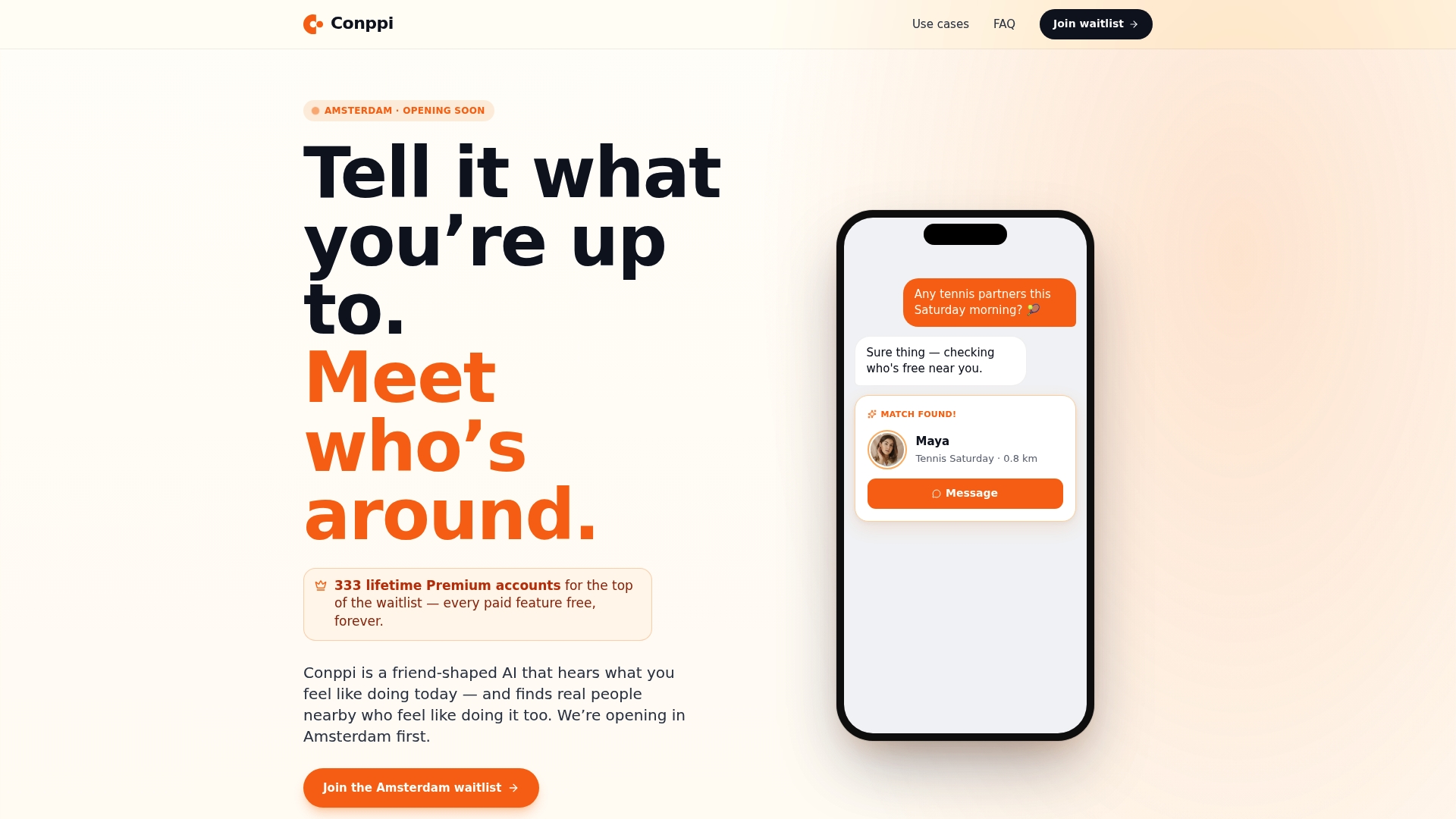
An app can match you with people nearby who want the same activity, such as tennis, co-working, or a coffee meetup, without profiles, swiping, or a running feed of your exact coordinates. Some apps share approximate distance instead of a precise location, and coordination happens around a specific activity and time rather than an open-ended tracking relationship. It's not a replacement for the safety habits above; use the same judgment meeting someone through Conppi that you'd use meeting anyone new, and keep your device-level permissions locked down regardless of which app you're using. But if the goal is finding a sports partner or someone to co-work with nearby without handing over live GPS access to a stranger, it's worth a look. Check out the activity partner app to see how the matching works before your next meetup.
Sources
- Location sharing | eSafety Commissioner
- 3 Reasons to Think Twice About Enabling Location Sharing | McAfee
- Security bugs in popular phone-tracking app iSharing exposed users' precise locations | TechCrunch
- ACM study on context-aware location sharing
- How to use your phone's location sharing for safety without compromising privacy | SafeWise
FAQ
What are the risks of location sharing?
The main risks are stalking or coercive control by someone with continued access, ad-tech profiling from stored location history, and accidental exposure through geotagged photos or forwarded links.
Is it safe to share my location?
It's safe when you control the recipient, set a time limit, and use an app with a solid security track record; it becomes risky when sharing runs indefinitely or gets forwarded beyond the person you intended.
Why shouldn't I share my location with everyone?
Broad or permanent sharing builds a history of your patterns, home, workplace, routine, that becomes far more damaging if the account is ever compromised or the relationship with the recipient changes.
Will someone know if I share my location with them?
Yes, most location-sharing features notify the recipient when a share starts, though notifications vary by app, so check the specific app's settings if privacy from the recipient's awareness matters to you.